Poseli
Write a post once, schedule it to every account

Write a post once and schedule it to Facebook, Instagram, Threads, LinkedIn, X, TikTok, YouTube, Telegram, Bluesky and Mastodon.

Coming SoonSocial Media Scheduling

Poseli posts to

InstagramFacebookTelegramTikTokThreadsLinkedInXYouTubeBlueskyMastodon

What is Poseli?

Poseli is a social media scheduler from Almeli Labs for businesses and content teams in Indonesia. You write a post once, pick the accounts (Facebook Pages, Instagram, Threads, LinkedIn, X, TikTok, YouTube, Telegram, Bluesky, Mastodon), set the time in your own timezone, and Poseli publishes it. Each account shows its own status, and a post that fails comes with the reason and an email.

Inside Poseli
the screens your team works in

Screenshots from the app, filled with sample data.

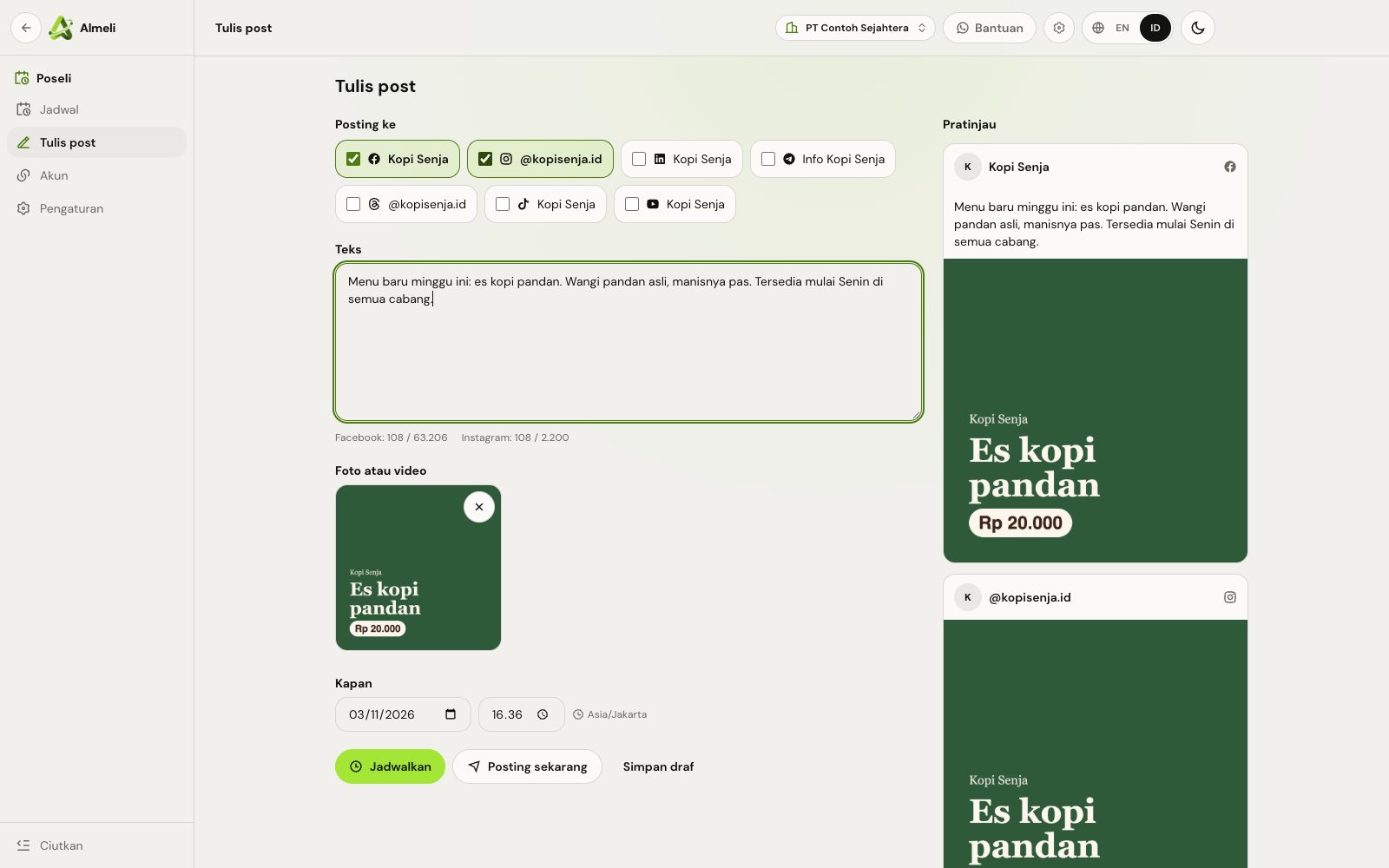
Write once, see it on every account

Tick the accounts, write the text and add a photo or video. The preview on the right changes with each account you pick.

  • Character count per platform, such as X 280 and Instagram 2,200
  • Photos are resized and converted for the platform in your browser
  • Schedule, post now or save as a draft
Poseli composer: Facebook and Instagram ticked, a promo text with a photo, and a preview for each account

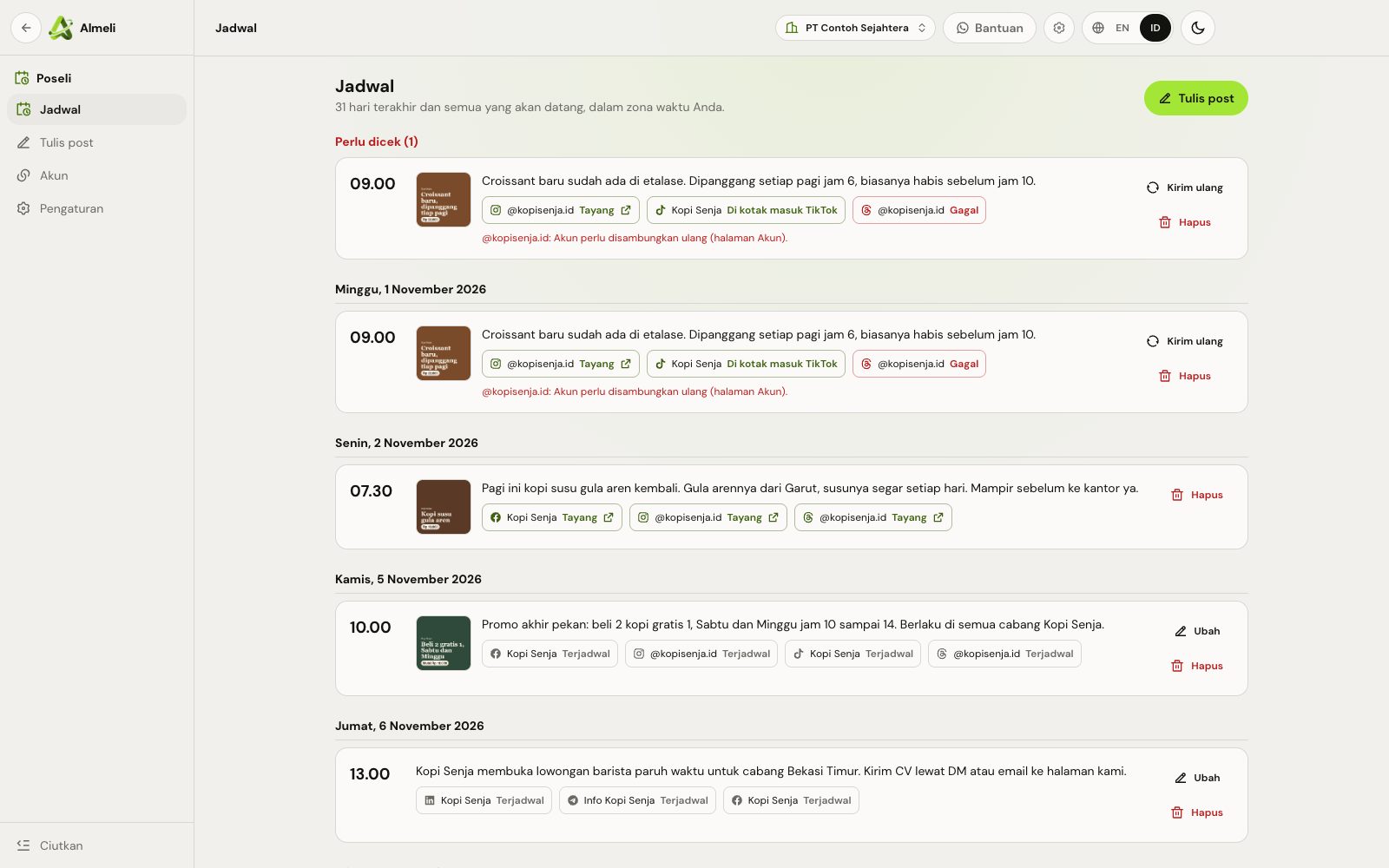
Every account's status, and why a post failed

One post to four accounts shows four statuses. A failed one moves to the top with the reason, and you send it again after fixing it.

  • Scheduled, live, failed, or waiting in the TikTok inbox
  • A link to each live post
  • An email to owners and admins when a post fails
Poseli schedule: a failed Threads post at the top with its reason, then posts by day with a status per account

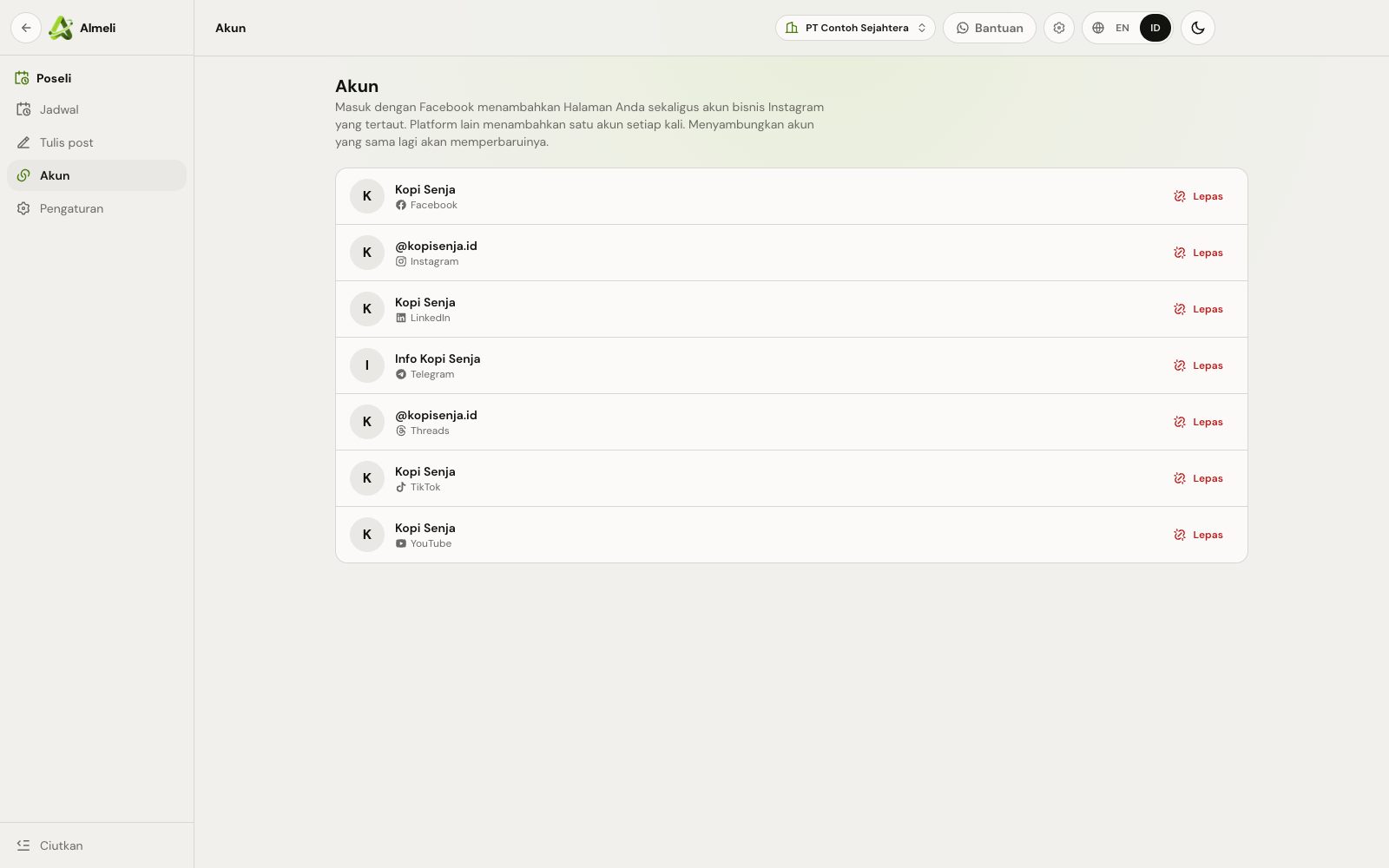
Every account in one list

Accounts are connected by signing in to the platform, so Poseli never asks for your password.

  • An account that needs signing in again is marked
  • LinkedIn warns you before its sign-in expires
  • Removing an account keeps the posts that are already live
Poseli accounts page listing Facebook, Instagram, LinkedIn, Telegram, Threads, TikTok and YouTube accounts

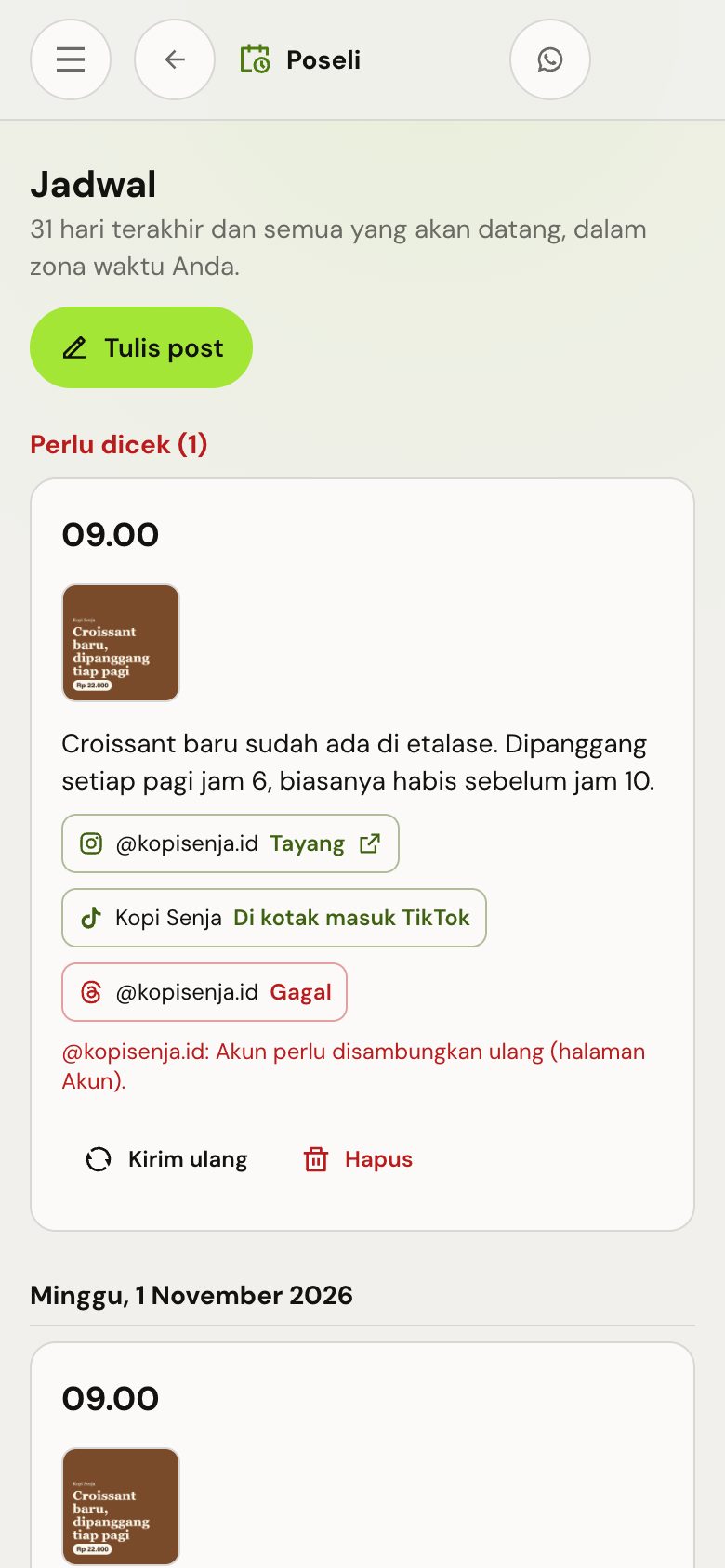
Check the schedule from your phone

Poseli runs in the browser, so the schedule, the composer and the send again button work on a phone without an app.

  • Write and schedule from the phone
  • Fix a failed post on the go
The Poseli schedule on a phone, with a failed post and its reason

How Poseli works
in four steps

  1. Connect your accounts

    Sign in to each platform from Poseli. One Facebook sign-in adds your Pages and their Instagram business accounts together.

  2. Write once

    Text, a photo or a video, with a character count for every platform you picked and a preview per account.

  3. Pick the time

    Schedule it in your own timezone, post it now, or keep it as a draft.

  4. Poseli posts and reports

    Each account gets its own status and link. A failed one says why, and owners and admins get an email.

What you get with Poseli
built for teams in Indonesia

  • One schedule for every account

    The last 31 days and everything ahead, grouped by day, with posts that need a look at the top.

  • Preview per account

    See how the post looks on each account before it goes out, with each platform's character limit counted as you type.

  • Video to YouTube, Reels and TikTok

    Large videos upload in pieces and carry on after a dropped connection (Lite and up).

  • Failures with a reason

    An account that needs signing in again, a photo the platform refused, a missed time: you read what happened and send it again.

  • Your timezone

    Times are set and shown in the timezone you write in, WIB, WITA or WIT.

  • Drafts and edits

    Save an idea as a draft, and change a scheduled post until it starts going out.

  • Built for a team

    Everyone writes and schedules. Owners and admins decide which accounts are connected.

  • A link to every live post

    Open the post on the platform straight from the schedule.

  • Platform limits kept

    Daily caps such as Threads' 250 posts and LinkedIn's 50 are checked before sending, so an account is not blocked for posting too much.

Who uses Poseli
and what changes

A small coffee shop counter with shelves of beans and cups

Shops, cafes and brands

Plan a week of menu updates and promos on Monday, and the same post reaches Instagram, Facebook, TikTok and Threads on time.

A small team working together on laptops at one table

Content teams and agencies

Several writers share one schedule, and a failed post is noticed by email instead of by a client.

Works with

  • Facebook Pages
  • Instagram
  • Threads
  • LinkedIn
  • X
  • TikTok
  • YouTube
  • Telegram
  • Bluesky
  • Mastodon

Plans for Poseli open at launch.

Join Early Access

Poseli questions
answered

Is there a free plan?

Yes. Poseli Gratis has 3 social accounts and 30 posts a month for photos and text, with no time limit. A post to three accounts counts as three.

Which platforms can I use today?

Each platform opens once its review with Meta, TikTok, Google or X is done. The accounts page in Poseli lists the ones that are open.

Where does video go?

To YouTube, Instagram (as a Reel) and TikTok, on Lite and up. TikTok puts the video in your TikTok inbox, and you post it from the TikTok app. Facebook, X and Threads take photos and text for now.

Why is X only on paid plans?

X charges for every post sent through its API, so X comes with Lite and up.

What happens if a post cannot go out?

The account shows Failed with the reason, owners and admins get an email, and you can send it again. A post Poseli could not send within 6 hours of its time is not sent late.

What happens to scheduled posts when the subscription ends?

They are not sent, and each one shows that the subscription had ended. Renew, then send them again.