Melikas
Orders from the table, paid straight into your account

Orders from the table by phone, paid by QRIS straight into your own account.

BetaPoint of Sale

Free plan available · 14-day free trial · No setup fee · Pay by QRIS or virtual account

What is Melikas?

Melikas is a cashier app from Almeli Labs for food stalls, cafes and small shops in Indonesia. It gives you a cashier screen in the browser and a menu buyers open by scanning the QR on their table. Products can have any options and extra prices, and QRIS payments settle to the merchant's own account, or through Almeli to be withdrawn to their bank.

Free trial
14 days, no payment
Paid plans from
Rp 49.900 / month, excl. PPN
Plans
Gratis, Lite, Pro, Enterprise
Billing
Monthly or yearly (2 months free)

Inside Melikas
the screens your team works in

Screenshots from the app, filled with sample data.

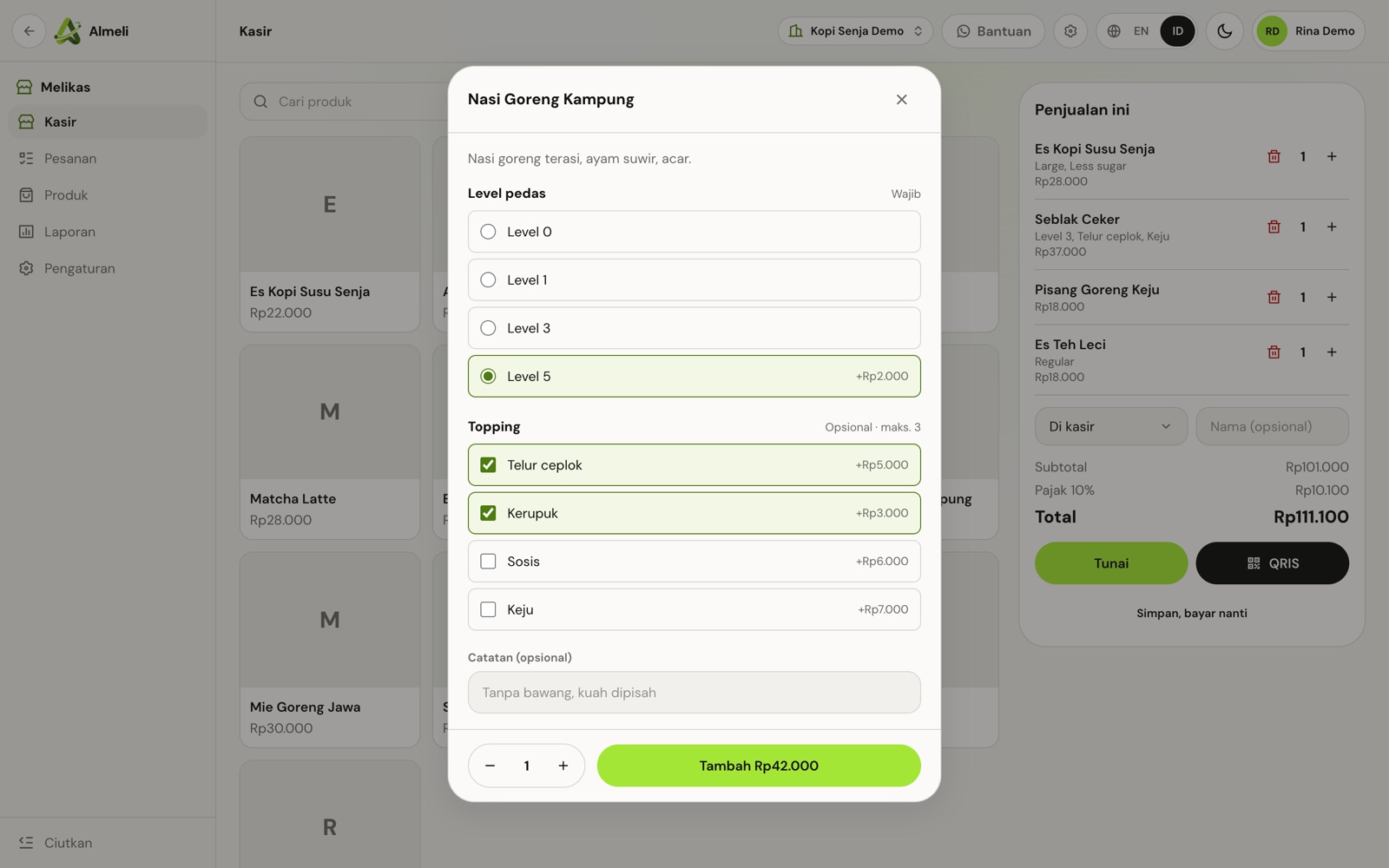
The cashier screen, options included

Tap a product, pick its options, and the price adds up as you go. The sale on the right shows tax and the total, ready for cash or QRIS.

  • Required and optional groups, with a maximum per group
  • A note per item, like no onions
  • Save a sale and take payment later
Melikas cashier screen with the options dialog for fried rice: spice level and toppings with extra prices

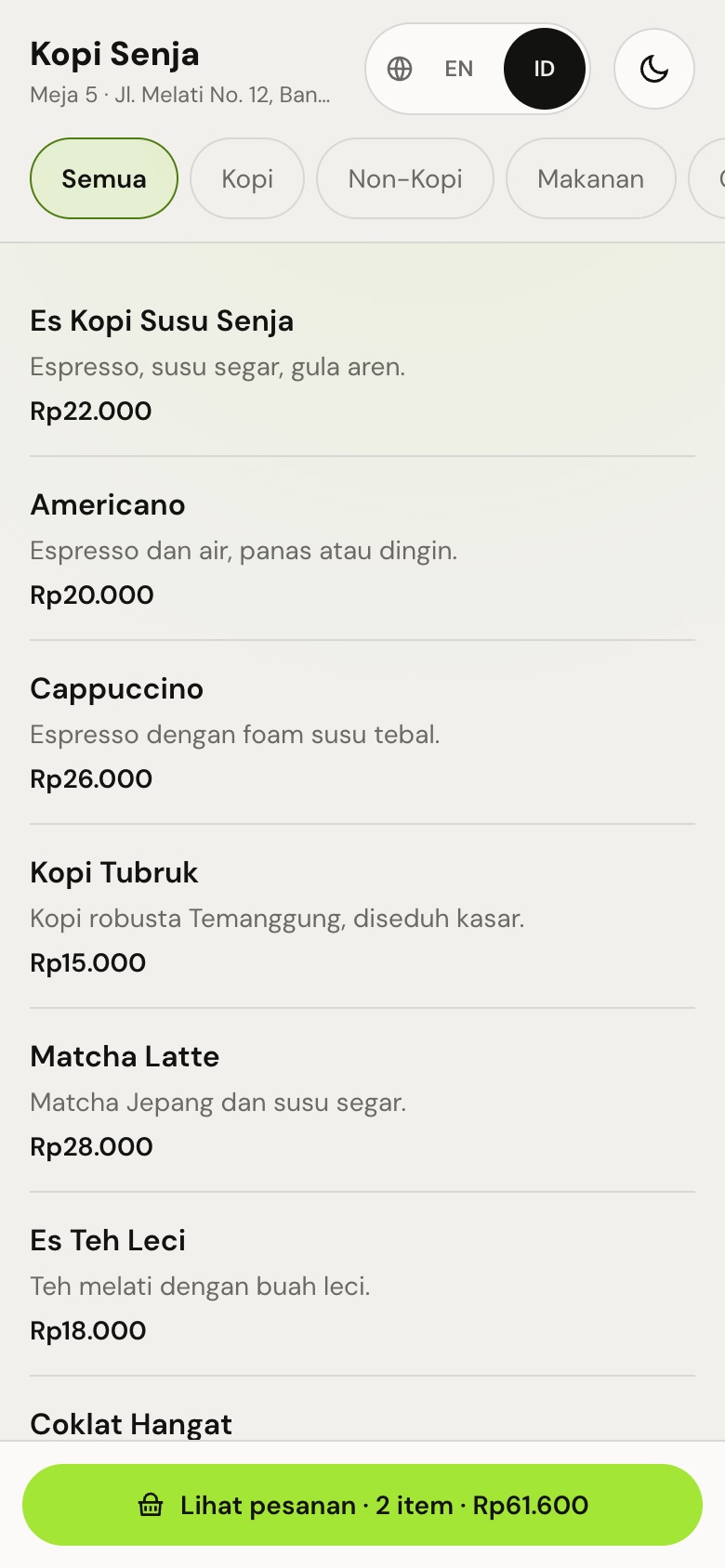
The menu buyers open from the table QR

The table number is already filled in. Buyers browse by category, pick options and send the order from their own phone.

  • No app to install and no account to create
  • Indonesian or English, light or dark
  • The basket shows the item count and total
The table menu on a phone: categories, items with prices and a basket button

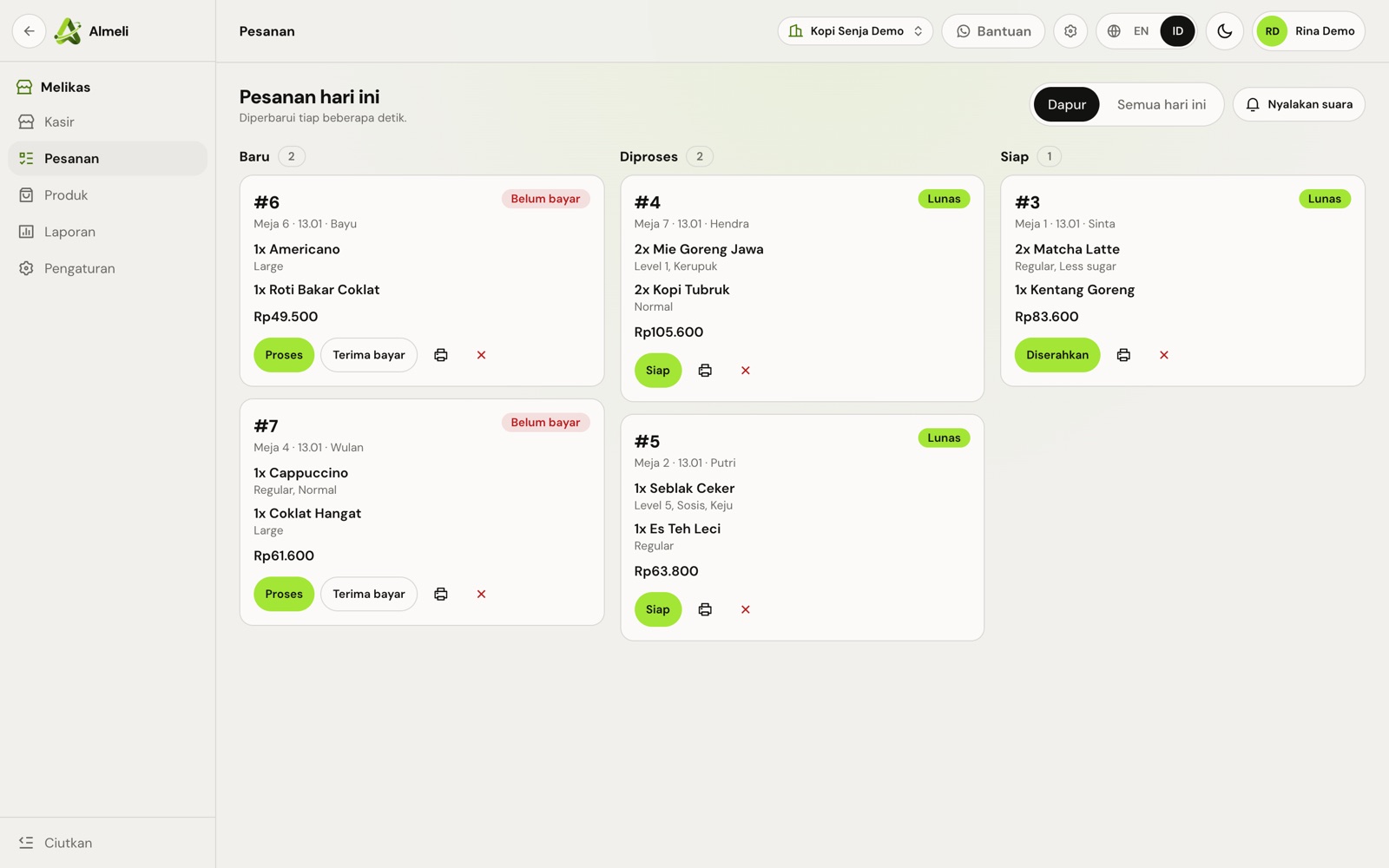
Every table order on the kitchen board

Orders arrive with their table and options, move from new to preparing to ready, and show whether they are paid.

  • Take payment from the board
  • Buyers follow the status from their phone
  • Mark an order handed over when it leaves the counter
Melikas kitchen board with table orders in new, preparing and ready columns, marked paid or unpaid

How Melikas works
in four steps

  1. Add your products

    Set a base price, then option groups like spice level, toppings or size, each with its own extra price.

  2. Upload your QRIS

    Use the static QRIS from your bank, GoBiz, OVO or DANA. Every order shows it with the exact amount filled in.

  3. Put a QR on each table

    Buyers scan, pick their options and pay by QRIS or at the cashier. No app and no account.

  4. Serve from the orders board

    New orders chime in the kitchen and move from New to Preparing to Ready while the buyer follows along.

What you get with Melikas
built for teams in Indonesia

  • Cashier screen in the browser

    Products by category, cash with change, QRIS, or save and pay later. Cash sales made offline are sent when the internet returns.

  • Products with any options

    Spice level, toppings, size, colour or sugar, with min and max picks and extra prices. Stock per product or per choice on Pro.

  • Order from the phone

    The table QR opens the menu with photos. The buyer enters a name, pays and follows the order status.

  • Three ways to take QRIS

    Your own QRIS, confirmed by the cashier once the money shows in your bank app. Or through Almeli: orders turn paid automatically and you withdraw to your bank. On Pro, connect your own Midtrans or Xendit instead.

  • Kitchen and orders board

    New, Preparing, Ready, with a chime for each new order. Turn on pay first if you need it.

  • 3D and AR menu

    On Pro, upload a .glb model and buyers can place it on their table in AR from the browser. A good photo is enough for most products.

  • Sales reports

    Revenue, paid and unpaid orders, QRIS against cash, best sellers and daily totals. 30 days on Free, 1 year on Pro.

Melikas plans
and what each includes

Prices exclude PPN 12%, added at checkout. Each period is billed on its own invoice; nothing is charged automatically.

Gratis

Untuk warung, kedai, dan toko yang baru mulai.

Freeforever

Start free
  • 2 akun tim
  • Produk dan transaksi tanpa batas
  • Produk dengan pilihan dan harga tambahan
  • Pesan dari HP lewat QR meja
  • Tiket dapur dan nomor antrean harian
  • QRIS milik Anda dengan nominal otomatis, atau tunai
  • Cetak struk 58 mm
  • Tetap jualan tunai saat offline
  • Laporan 30 hari

Lite

Untuk usaha yang mulai menghitung stok.

Rp 49.900per month, excl. PPN

or Rp 499.000 a year, 2 months free

Try 14 days free
  • 5 akun tim
  • Semua fitur Gratis
  • Stok produk dan per varian
  • Laporan 90 hari

Enterprise

Untuk jaringan usaha dengan kebutuhan khusus.

  • Akun tim sesuai kontrak
  • Integrasi sesuai kebutuhan
  • Engineer khusus

fromRp 699.000per month, by contract

Contact sales

How to order Melikas
from sign-up to your first day

  1. Create your Almeli account

    Sign up with your work email and open the verification link we send. The same account opens every Almeli product.

  2. Choose a plan

    In the console checkout, pick a plan and monthly or yearly billing. A voucher or referral code goes here too.

  3. Start free or pay

    Free plan: it is active right away, with no payment. Paid plans are paid by QRIS or virtual account.

  4. Open Melikas and invite your team

    Open it from the console, add team accounts by email, then follow the setup steps above.

Who uses Melikas
and what changes

A cafe counter with tables and chairs in front

Warung, kedai and cafes

Buyers order and pay from their table, and each order reaches the kitchen board with its spice level and toppings.

Clothes on racks and shelves in a small shop

Small shops

Sell one shirt in several sizes and colours, track stock per choice on Pro, and take cash or QRIS at the counter.

Works with

  • QRIS
  • GoBiz
  • OVO
  • DANA
  • Midtrans
  • Xendit
  • 58 mm printer

Melikas questions
answered

Is there a free plan?

Yes. Melikas Gratis has 2 team accounts (people who can sign in), unlimited products and transactions, table QR ordering, your own QRIS or cash, the kitchen screen and 30 days of reports.

Does the money go through Almeli?

Only if you choose it. With your own QRIS, or your own Midtrans or Xendit on Pro, buyers pay you directly and it settles to your bank. With payment through Almeli, the money goes to your balance in the console and you withdraw it to your bank; the fee per payment shows there.

How does the cashier know a QRIS order is paid?

With your own QRIS, the cashier confirms once the money shows in your bank app, never from a buyer's screenshot. With Midtrans or Xendit connected on Pro, the order turns paid automatically.

Do buyers need to install an app?

No. They scan the table QR, order in the browser and follow the status there, without an account.

Which printers work?

Receipts are sized for 58 mm printers and print from the browser. Bluetooth printers work through your device's print dialog.

Can we run more than one store?

Not yet. Each organization has one store.

Start using Melikas
Orders from the table, paid straight into your account

Free plan available14-day free trialNo setup feePay by QRIS or virtual account